I picked SoundCloud to try out for Audio Files, thing 16. SoundCloud is more than just recording. It lets you hear music, record audio and share what you record. I saw it referred to as the YouTube for audio files. It could be used to record oral histories or you could make travel comments and put them on Facebook. You could record yourself reading a book for your grandchildren. The app includes the capability to geotag recordings with local information. There are a lot of possibilities.
This app was actually more than I bargained for since the site it connects to includes music and audio in all genres--like a Spotify site. I used my Facebook to log in but I suppose this is another account for me on another site that I probably won't use again.
Friday, June 13, 2014

Thursday, June 12, 2014
Thing 15
Infographics is a new term for me although once I started looking at examples of infographics, I realized it is just a new term applied to updated ways of using graphs, charts, and other graphics to show data. These infographics are visual representations of information that present complex information quickly and clearly. You can see patterns and trends at a glance rather than poring over tables of raw data. I am sure everyone would agree that seeing complex data represented in this way is much easier to understand and use.

I created the infographic above using i Visual Info Touch Lite. Since I write a number of reports that display various statistics, a program like this would probably be very useful. If you look at my different labeled balls in my graphic, their relative sizes have nothing to do with the numbers they represent. I just sized the smaller balls in relation to the biggest ball. Not very scientific or accurate I am afraid, so I would need to work on making these more accurate. The app itself was easy to use and I was able to save it and use it here without any problem. This topic is well worth my time to explore it more fully.
Thing 14
Thing number 14 is videos. I looked at the Vine application and watched some of the six second videos. Some were silly, of course, but some of them showed an amazing amount of information in six seconds. I found another link to videos that stitched videos together into something longer and more meaningful. In the right creative hands, they could be very useful. I am not sure how it could be used for a library, but I could see it as part of some larger presentation. The app itself was easy to use and it came with a very short tutorial that showed the instructions on the screen as you made the video.
Thing 13
Thing 13 has a some presentation apps and whiteboard apps. I tried the Deck Slideshow Presentation App first. It was very simple to use once I figured it out, but it seemed very simplistic. I would not have wanted to try to explain anything complicated using this app. I made five slides pretty quickly and picked out a theme that didn't cost anything and I was done. There was not a lot of choice for free themes.
I also tried the Haiku Deck and that was really easy and fun to use. The tutorial was entertaining and I quickly had an attractive short presentation. I used my Twitter account to upload the presentation and then was able to access it online. This is handy if you have to present and will have online access. I would use this for something short and quick, but for the usual presentations I feel like I need PowerPoint is the best choice. I did read somewhere that you can import PowerPoint presentations into Haiku Deck and I suppose if you wanted online access you might do that. However, if I had already gone through the trouble of making a PowerPoint presentation, I doubt I would import it into Haiku.
I also tried the Haiku Deck and that was really easy and fun to use. The tutorial was entertaining and I quickly had an attractive short presentation. I used my Twitter account to upload the presentation and then was able to access it online. This is handy if you have to present and will have online access. I would use this for something short and quick, but for the usual presentations I feel like I need PowerPoint is the best choice. I did read somewhere that you can import PowerPoint presentations into Haiku Deck and I suppose if you wanted online access you might do that. However, if I had already gone through the trouble of making a PowerPoint presentation, I doubt I would import it into Haiku.
Thing 12
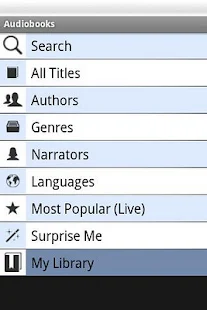 For Books, Books, Books, I picked the Audiobooks App to try. Everything is in the public domain and therefore free to listen to.The App works well, streaming the audio smoothly. The files download eventually, so you can listen to them offline. I listened to a bit of Black Beauty and found it clear and enjoyable listening. I then started listening to Alice in Wonderland and it had a whole cast of narrators which is really quite impressive for a free audio book. Free audio books are also available in different languages, so I got a book in Spanish in hopes of refining my comprehension. There is also an offering of recent podcasts so I now have one from NPR to enjoy later.
The app has automatic bookmarking and a sleep timer. You can pick from a list of titles, authors, genres, narrators, languages, and even a "Surprise Me" category. The player has the usual controls, rewind, fast forward, play, etc. It tells you what part you are on and how many minutes left. I did have a problem with the downloading of a book. I changed my mind after it started and then was not able to stop it in progress. The delete function says delete "heard" podcasts, so I wonder if I will be able to get rid of it without listening to it. I will let you know when it gets done downloading!
I have downloaded a lot of audio books through OverDrive from the public library and although the selection is better and the titles are newer, I think the quality of listening with this App is excellent and very easy to accomplish. There are some ads running across the bottom of the App but I did not find it a problem. It really is amazing what you can get for free.
Tuesday, June 10, 2014
Thing 11
My Library does not have its own mobile page or App, but we do have a few Apps that we have subscribed to and use. We have the Chronicle of Higher Education App and the Press Reader App from Newspaper Direct. We also have Browzine, an App we have paid for that allows our users to create virtual bookshelves of journals in their subject areas. Individual articles can be saved and read offline in an easier to read tablet format. It is easy to organize your professional reading using this tool.
We have publicized all these tools in our LibGuides subject guides, our newsletter, our homepage, and on our electronic monitors throughout the Library. I am not sure if we can get any statistics for these Apps, but it would be interesting to know if they are being used given the time we have devoted to them. I, myself, enjoy reading on tablets and reading journal articles is (to me) better on a tablet than on a computer screen. You can tilt the screen and bring it closer to your face and sit anywhere you like (almost like reading a book) Even though the Apps work on phones, I am not sure I would ever read articles on a
phone.

We have publicized all these tools in our LibGuides subject guides, our newsletter, our homepage, and on our electronic monitors throughout the Library. I am not sure if we can get any statistics for these Apps, but it would be interesting to know if they are being used given the time we have devoted to them. I, myself, enjoy reading on tablets and reading journal articles is (to me) better on a tablet than on a computer screen. You can tilt the screen and bring it closer to your face and sit anywhere you like (almost like reading a book) Even though the Apps work on phones, I am not sure I would ever read articles on a
phone.
Thing 10
I had never used Instagram before but set up an account and logged in. I lurked around seeing if there was anyone I knew there. Since I have two relatives on Facebook who are either professional photographers or budding professional photographers, it was easy to find their Instagram accounts and see what they shared. I found some very creative photos and it really showed me the difference between pictures I take and pictures they take! Nevertheless, I snapped a photo in the Instagram app and checked out the editing functions. Editing is very simple in Instagram--I liked it better in the Aviary photo editor. I used Flickr a few years back, but stopped and I have the feeling I won't do much sharing on Instagram either. I am glad I tried it.
Subscribe to:
Posts (Atom)